
 Facebook
  Twitter
  LinkedIn
 Shift Pricing in Arez Operate
Charge rates, pay rates, overrides, manual changes and approvals
Every shift has two commercial components: the charge rate (billed to the client) and the pay rate (paid to the worker). Shift pricing directly affects client invoicing, worker payments, payroll accuracy, margin control and financial approvals.
Arez Operate supports pricing from a client contract, as well as more specific overrides through site contracts, worker pay overrides, manual shift rates, and approval-controlled pricing changes. This document is intended for operations teams, managers, finance, payroll, onboarding and training users.
Why Shift Pricing Matters
Client invoicing
The charge rate determines how much the client is billed. This is important where different rates apply for weekdays, weekends, bank holidays, night shifts, emergency cover, worker roles, sites or specific client terms.
Worker pay and payroll
The pay rate determines how much the worker is paid. It affects payroll accuracy, worker trust, salary calculations, pay queries, holiday calculations, overtime checks and weekly or monthly payroll review.
Margin control
Arez Operate helps the business understand the difference between what is charged to the client and what is paid to the worker. This helps managers protect margin while still allowing controlled flexibility when real-life operational changes are needed.
Financial governance
Because rate changes can affect invoicing, payroll and profit margin, Arez Operate uses an approval process for manual rate changes. The approval route can depend on the value of the change.
How Arez-Operate Decides Shift Pricing
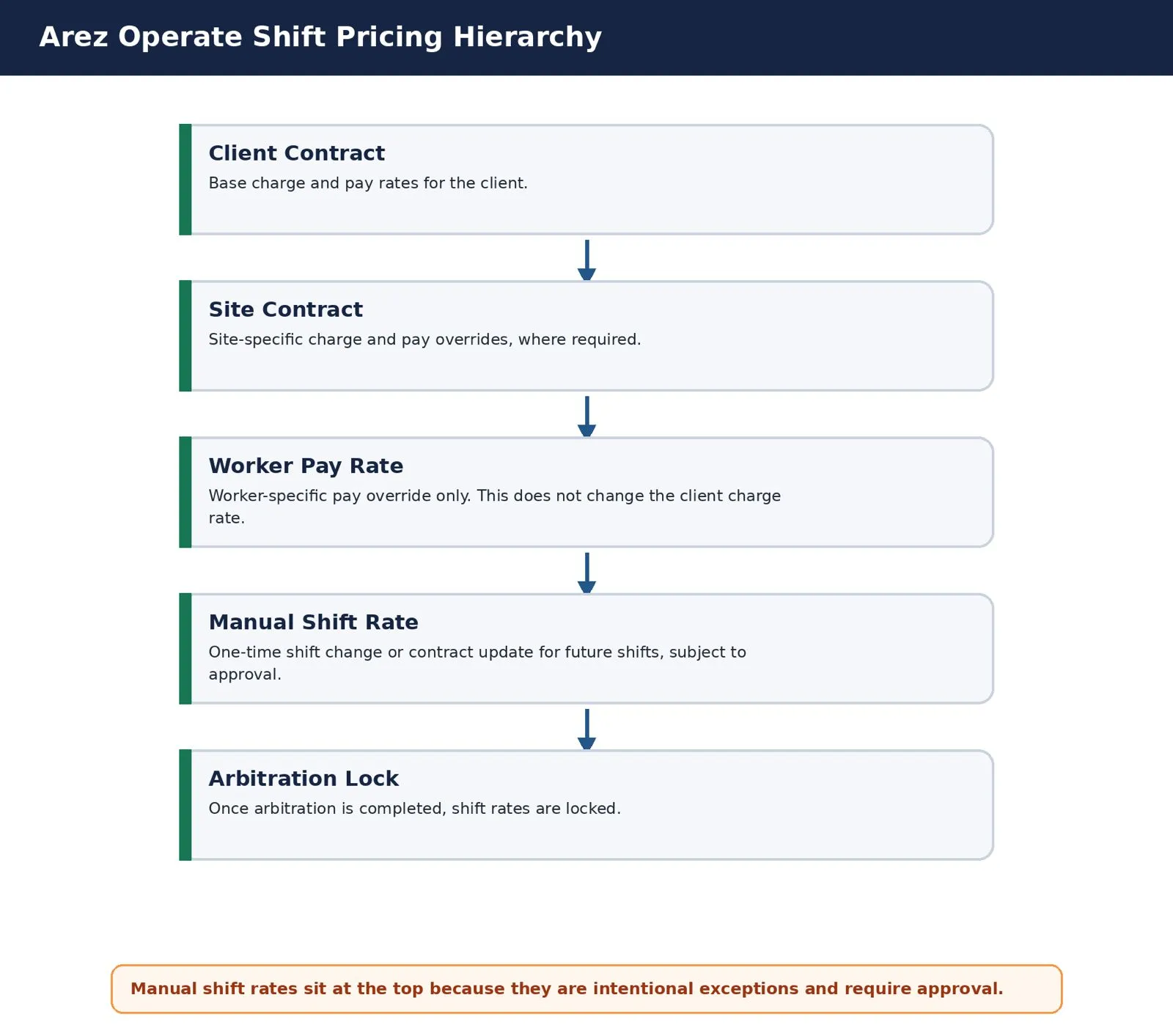
Arez Operate follows a clear pricing hierarchy. The system starts with the client contract, then checks whether there are more specific overrides at the site, worker or shift level.
1. Client Contract: Base Rates
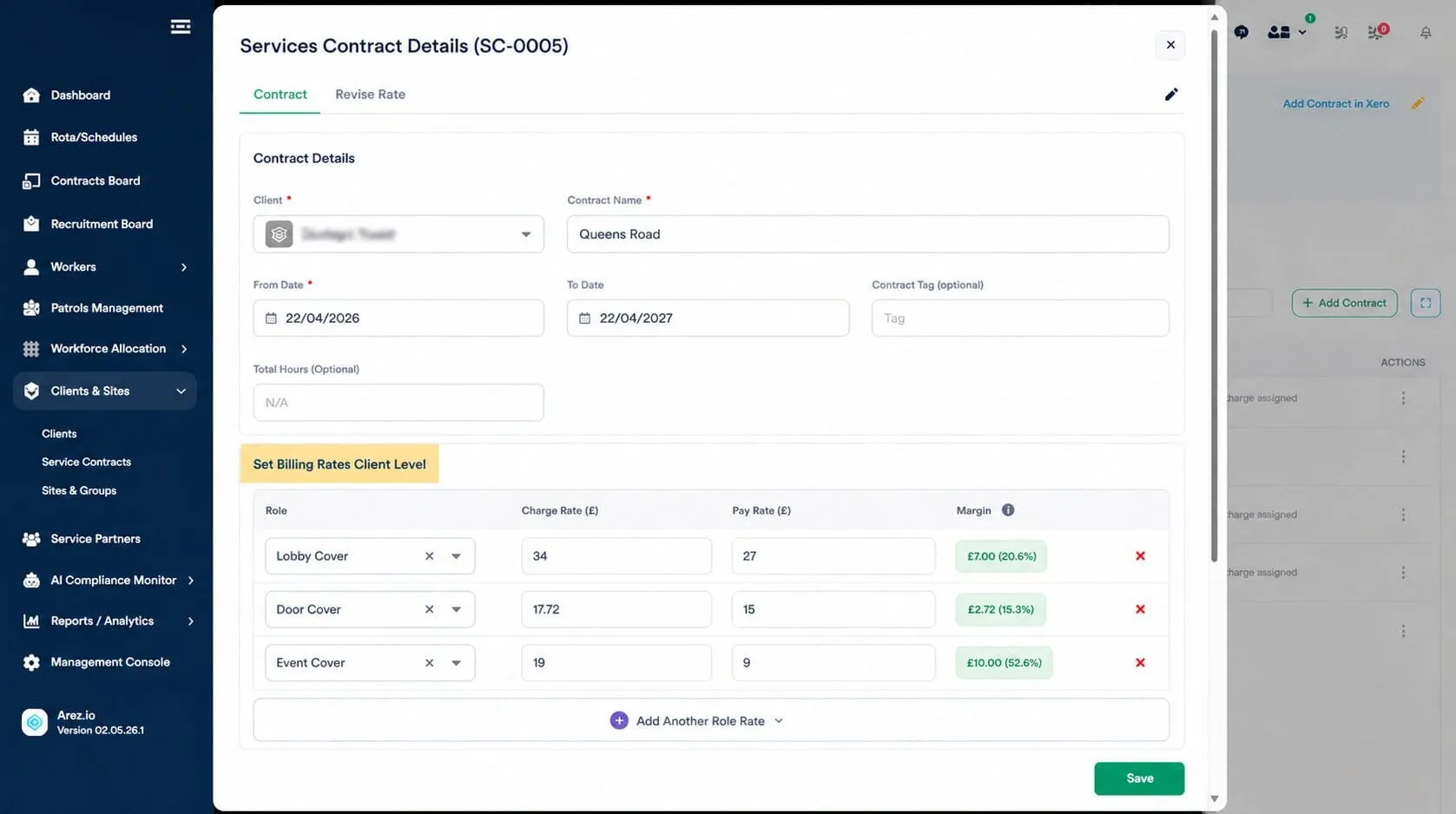
The client contract defines the standard commercial rates for a client. These rates apply to all shifts unless a more specific override exists.
A client contract includes:
• Worker role
• Charge rate
• Pay rate
• Day type
• Shift type
• Start date and end date
• Contract status
• Payment terms (where applicable)
Example
Role: Security Guard | Charge Rate: £18.00 per hour | Pay Rate: £12.50 per hour
Client contracts ensure pricing consistency across the account and reduce manual rate entry when creating shifts.
2. Site Contract: Site-Level Overrides
A site contract overrides the client contract rates for a specific site. Use site-level pricing when a site has commercially distinct terms from the standard client contract.
Apply a site contract when:
• The site has different agreed charge rates
• The site requires higher-skilled workers
• The site carries higher risk or operational complexity
• The site operates under different hours
• The site has separate commercial terms
• The client has different pricing across multiple locations
Example
Client contract: Charge £18.00 | Pay £12.50. Site contract: Charge £21.00 | Pay £14.00. Final shift pricing: Charge £21.00 | Pay £14.00.
Site contracts allow flexible pricing for complex clients without modifying the main client contract.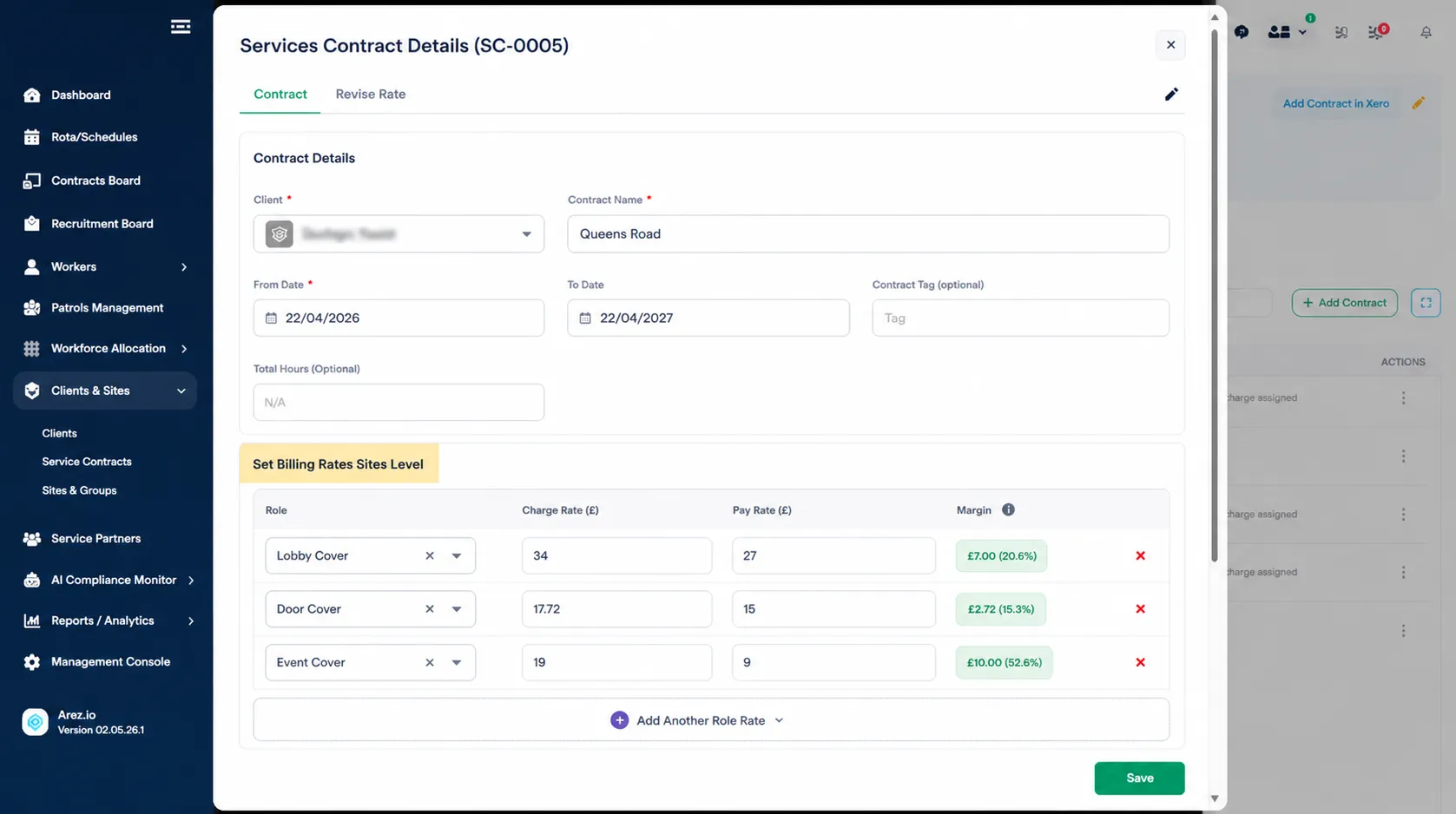
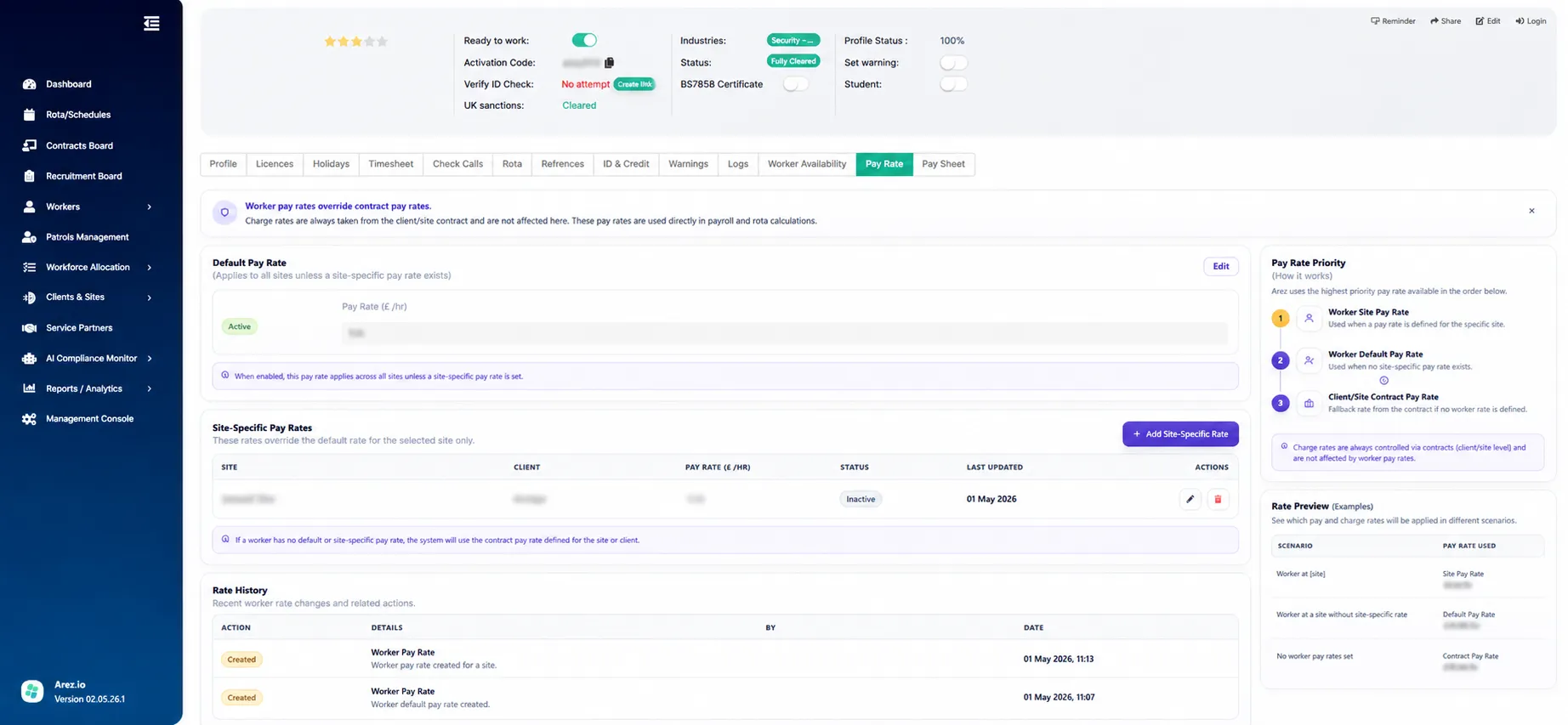
3. Worker Pay Rates: Pay Override Only
A worker pay rate overrides the pay rate for a specific worker. Use this when a worker is paid differently from the standard site or client rate.
Common reasons include:
• Experience or seniority
• Specialist skills
• TUPE arrangements
• Legacy pay agreements
• Temporary approved pay arrangements
• Site-specific worker agreements
Important: Worker pay rates override pay only. The charge rate continues to come from the client contract or site contract. Worker pay arrangements do not affect client billing.
Example
Site contract: Charge £21.00 | Pay £14.00. Worker pay override: Pay £15.50. Final shift pricing: Charge £21.00 | Pay £15.50.
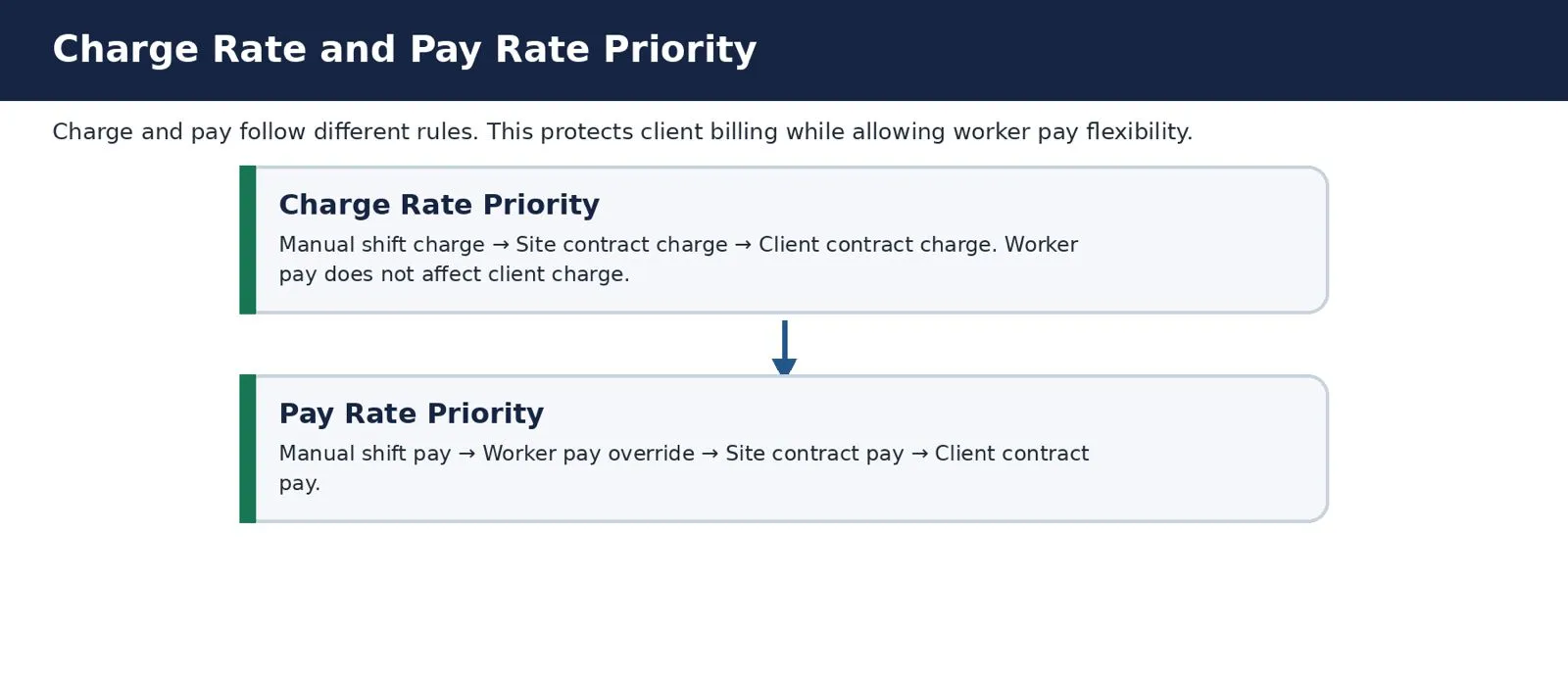
4. Manual Shift Rates
A manual shift rate overrides the charge rate, pay rate, or both on a specific shift. Use manual shift rates for exceptions, corrections or approved commercial changes not yet reflected in the contract.
Common reasons include:
• One-off pay uplift for a worker
• One-off charge agreed with the client
• Emergency cover requiring a non-standard rate
• A shift created with an incorrect rate
• An out-of-date contract rate
• A new agreed rate for a site
• A role or shift type not yet in the contract
• A rate correction identified by finance or payroll before arbitration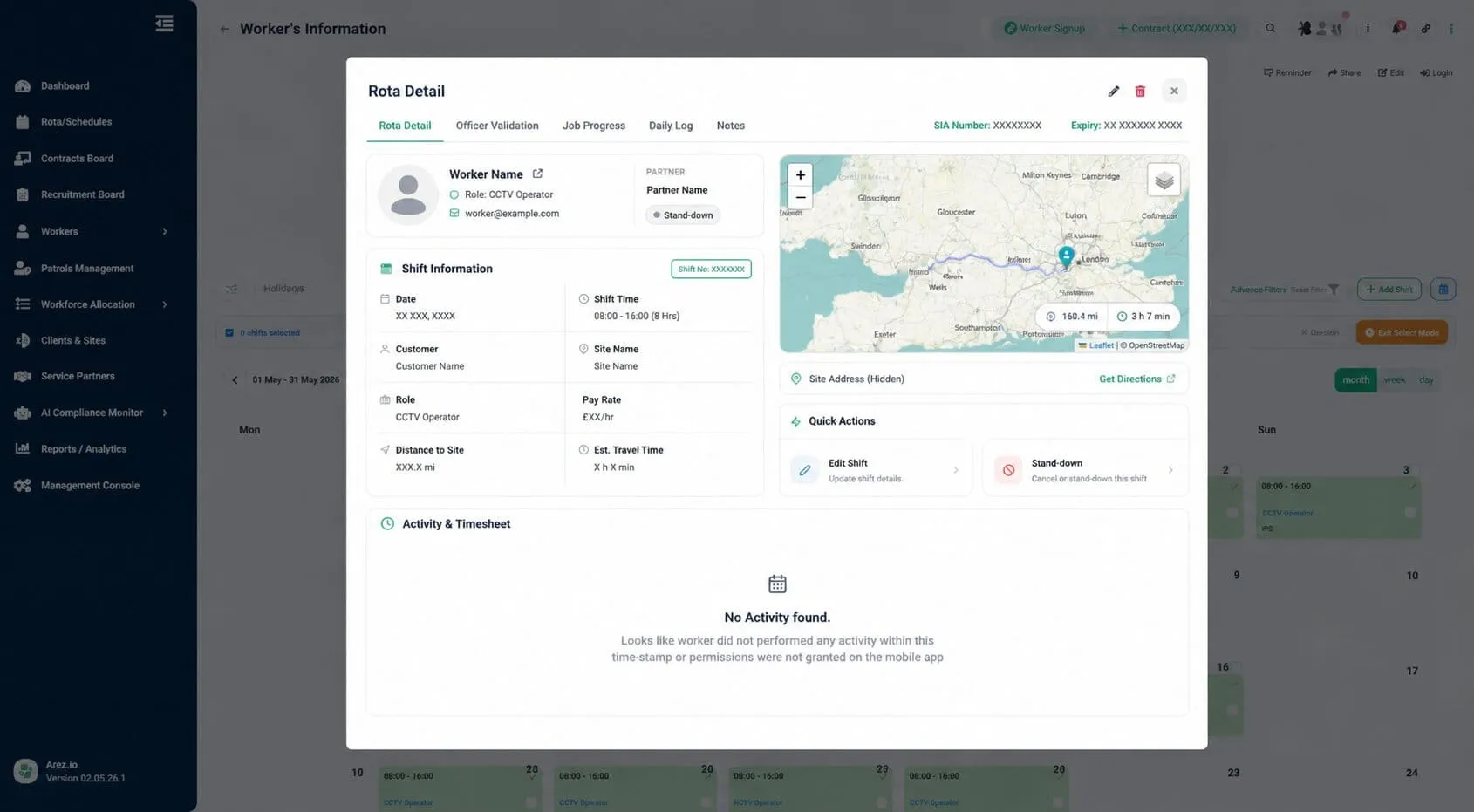
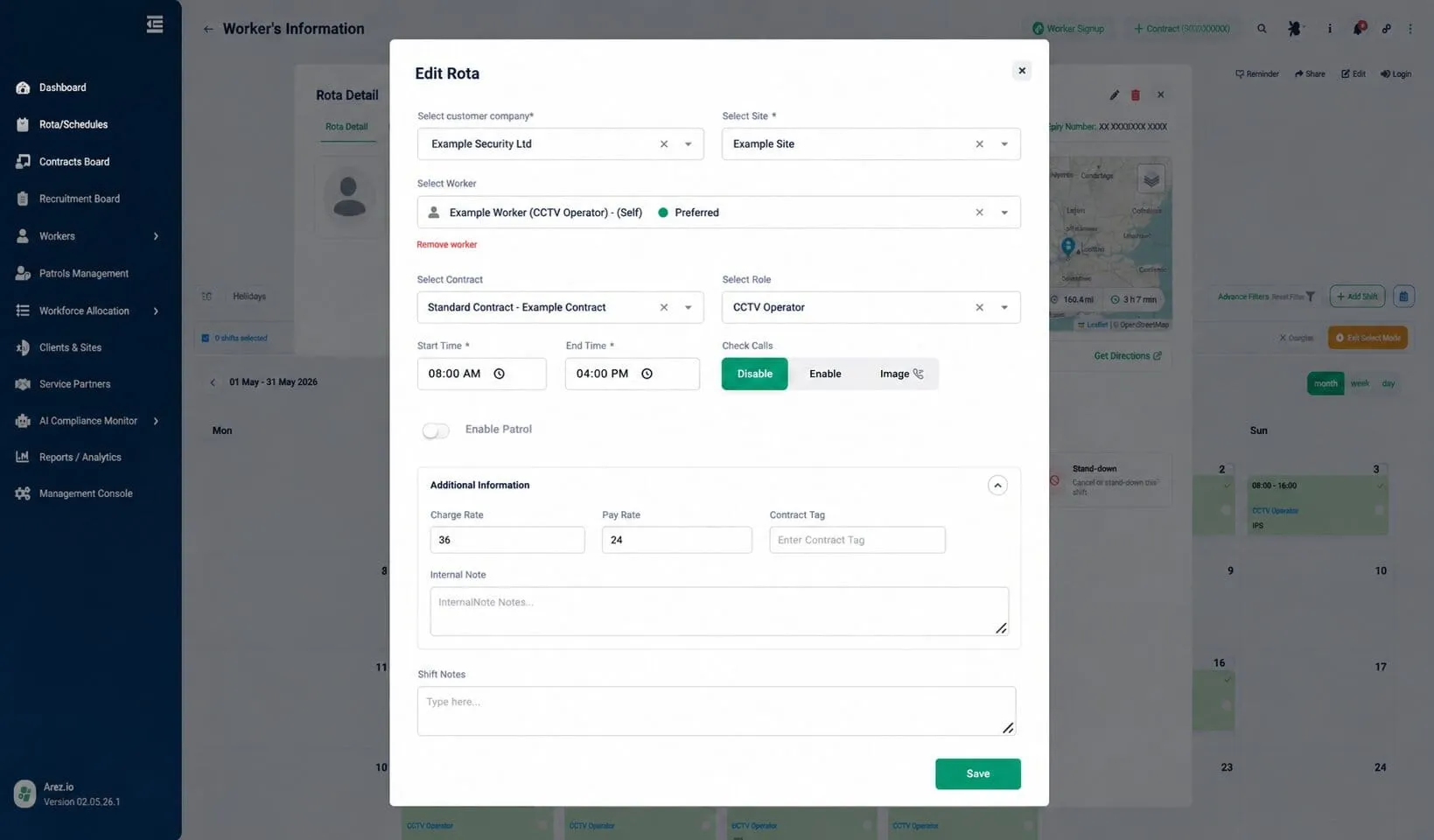
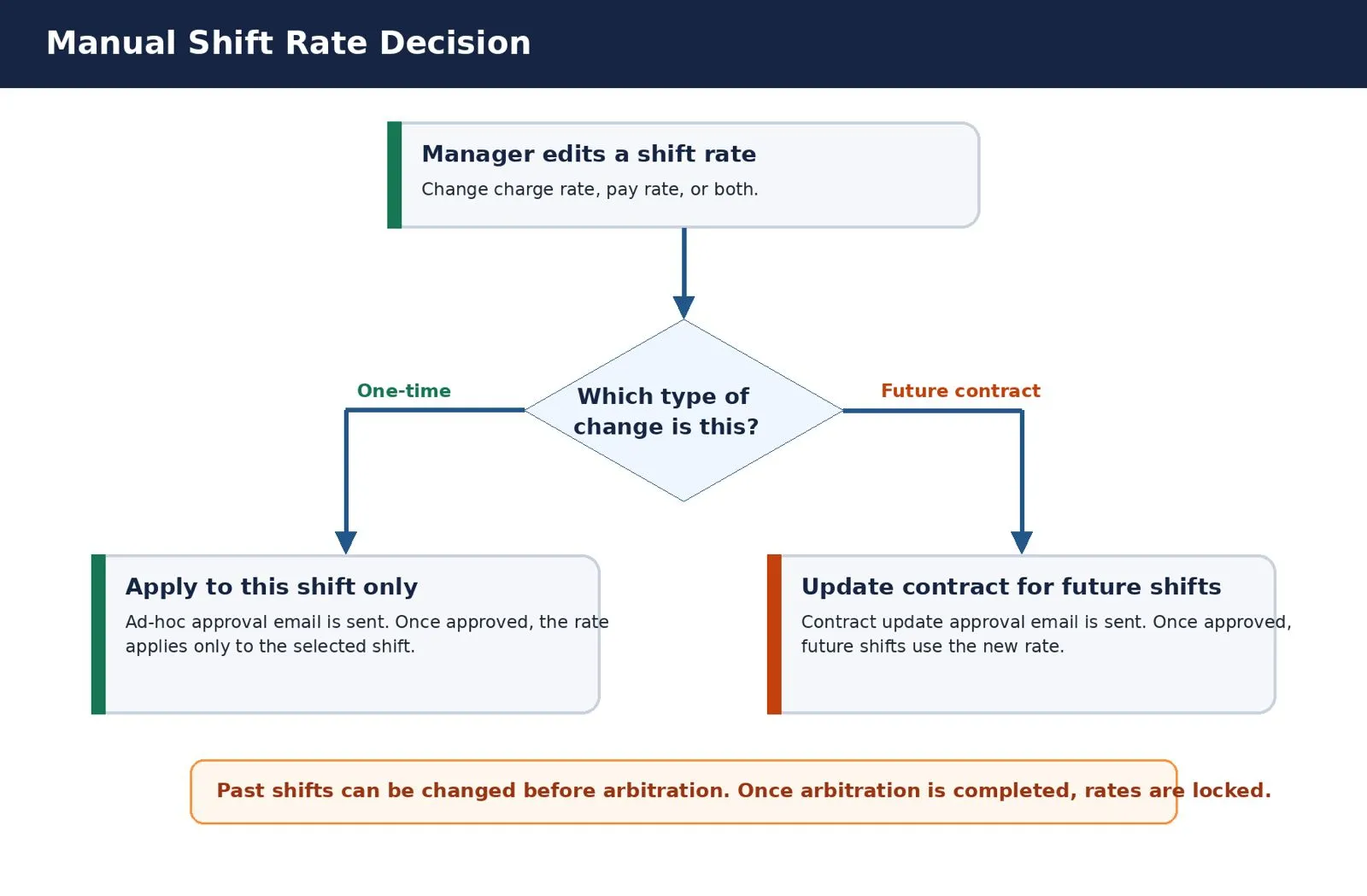
Option 1: Apply to This Shift Only
Use this option when the rate change applies to one shift and must not affect the contract or future shifts.
Use Apply to this shift only when:
• The change applies to a single shift
• A worker receives a one-off pay uplift
• A client agrees a one-off charge
• A single shift requires correction
• The change must not propagate to future shifts
To apply a one-time manual shift rate:
1. Open the shift in the Rota.
2. Select Manual Shift Rate.
3. Enter the new charge rate, pay rate, or both.
4. Select Apply to this shift only.
5. Submit the change.
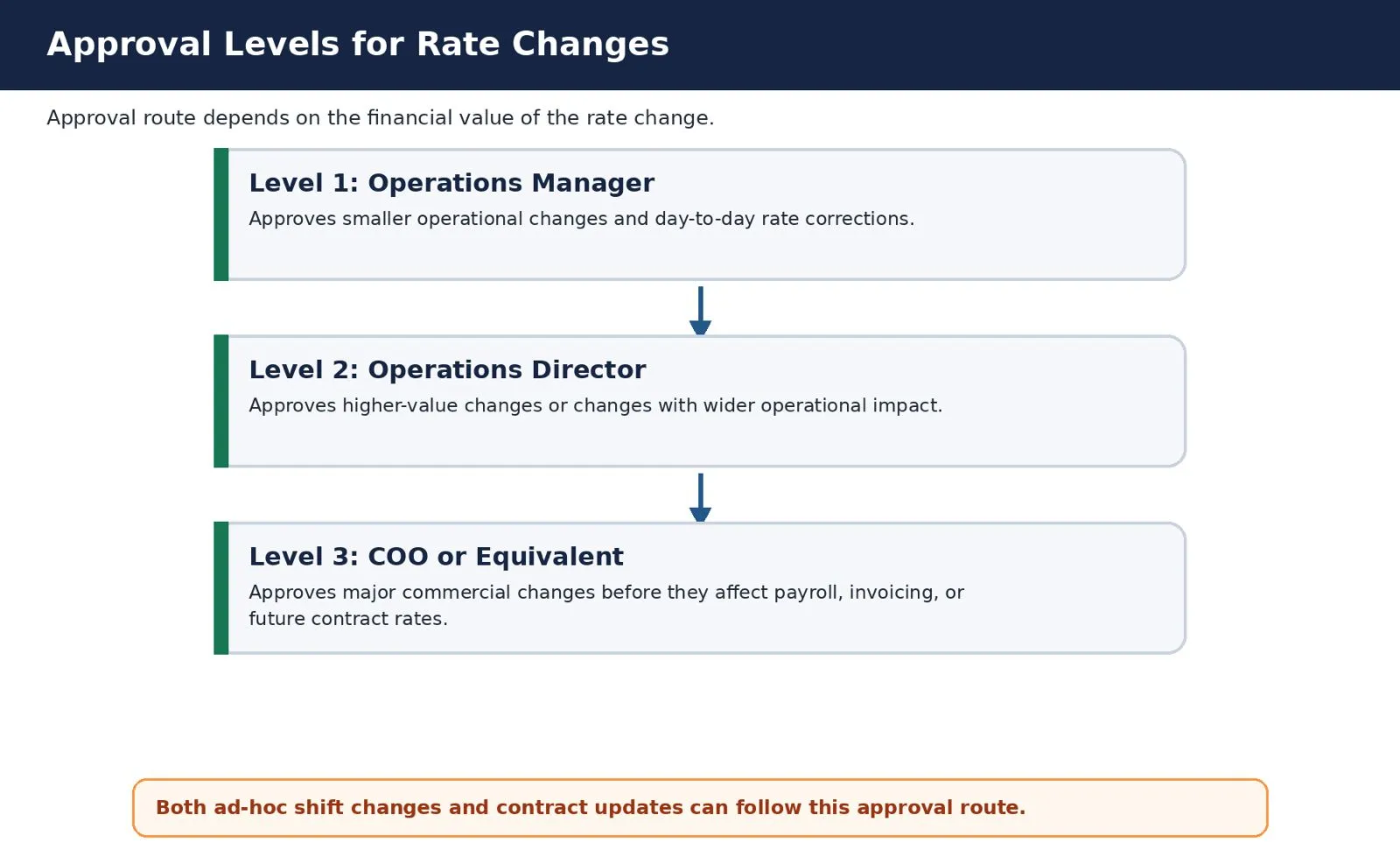
Arez Operate sends an Ad-Hoc Rate Approval Email. The approval level depends on the financial value of the change. Low-value changes may require Operations Manager approval; higher-value changes may require Operations Director and COO (or equivalent) approval.
Once approved, the new rate applies to that shift only. The client contract and site contract are not updated.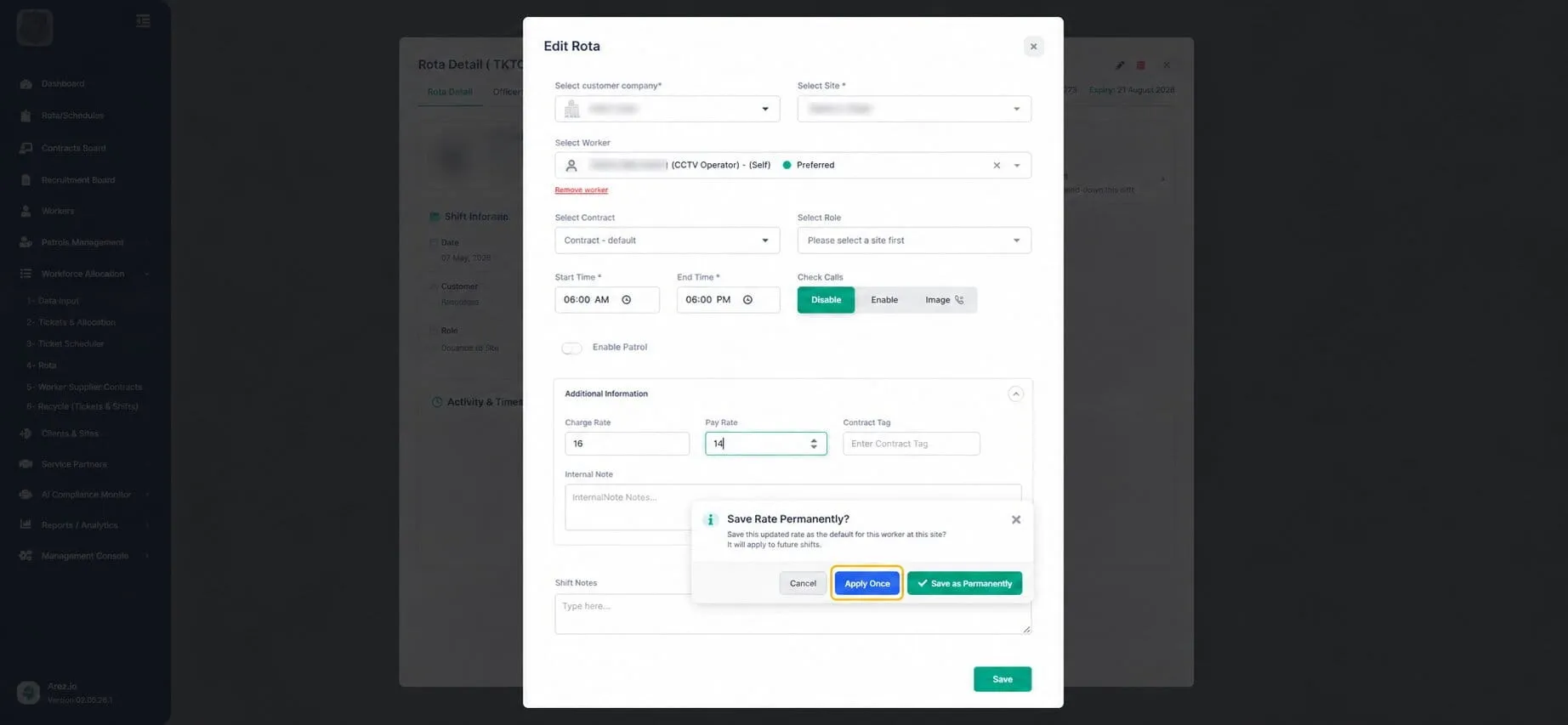
Option 2: Update Contract for Future Shifts
Use this option when the rate change should become the correct rate going forward and the contract requires updating for all future shifts.
Use the update contract for future shifts when:
• A new client rate has been agreed
• A site rate has changed
• A role rate has changed
• Future shifts should use the new rate
• A repeated manual change indicates that the contract is out of date
To request a contract update:
6. Open the shift in the Rota.
7. Select Manual Shift Rate.
8. Enter the new charge rate, pay rate, or both.
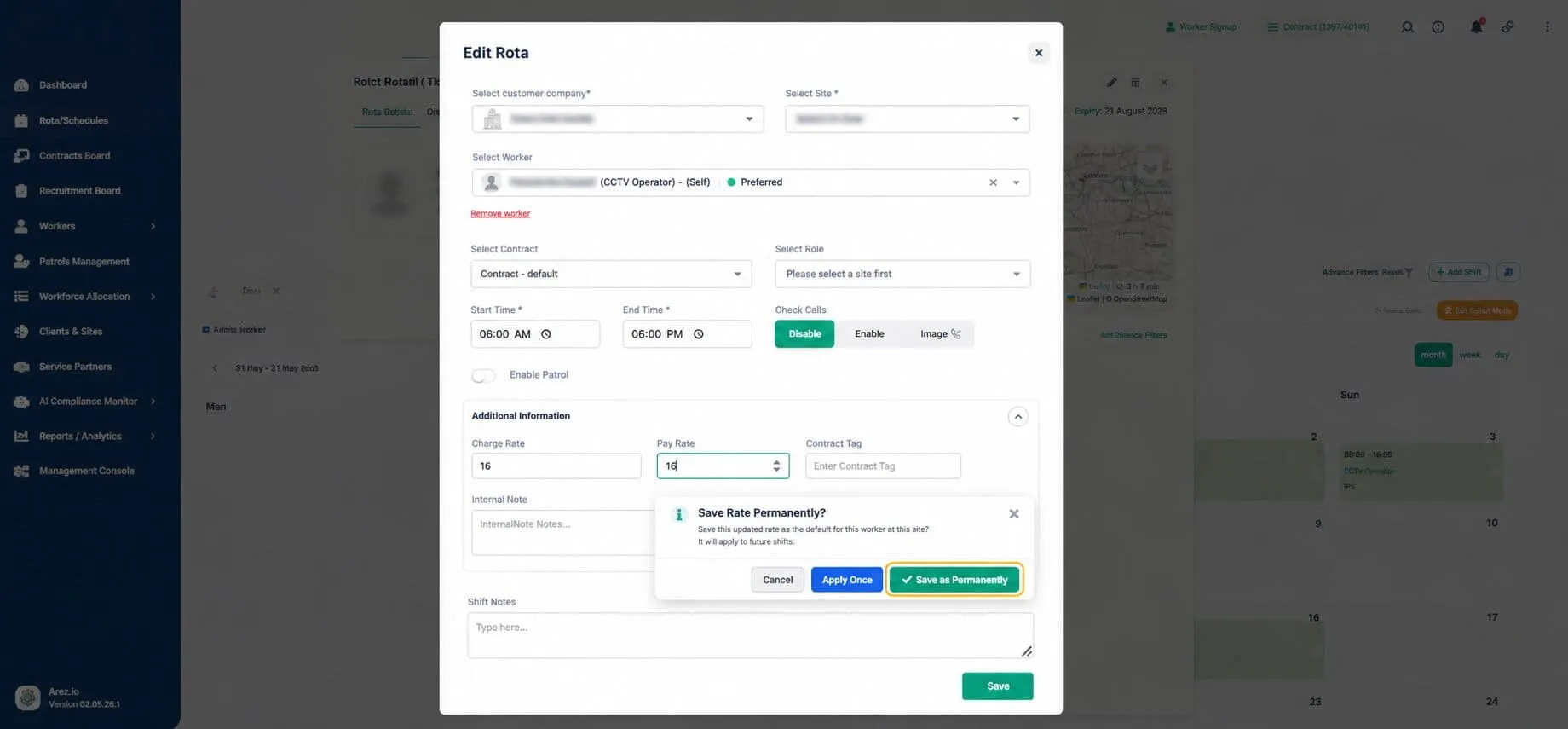
9. Select Update contract for future shifts.
10. Submit the change.
Arez Operate sends a Contract Update Approval Email. The approval level depends on the financial value of the proposed contract change.
Once approved, the contract is updated and future shifts use the new rate. Past shifts are not automatically changed unless they are manually updated before arbitration is completed.
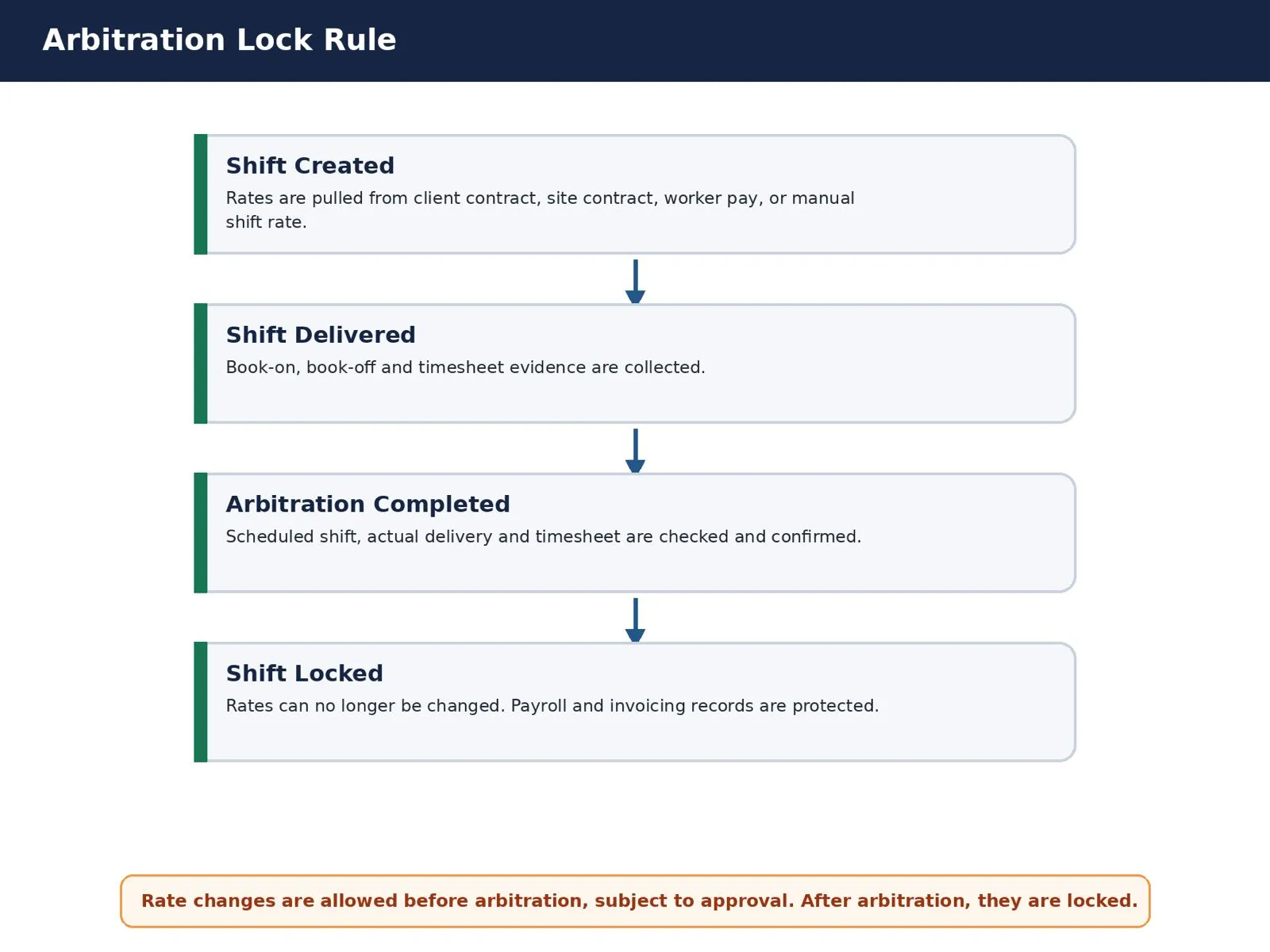
Past Shifts, Future Shifts and Arbitration
Rates on past shifts can be changed, but only before arbitration is completed. This allows operations teams to correct rates during weekly or monthly review before shifts pass to payroll or invoicing.
Before Arbitration
Rates remain editable, subject to approval. Edit past shift rates when:
• A rate was entered incorrectly
• A manager approved a one-off change after the shift was created
• Finance identifies a rate mismatch
• Payroll requires a correction
• The shift was delivered differently from the original rota
After Arbitration
Once arbitration is completed, the shift is locked. Rates on locked shifts cannot be changed.
Arbitration protects payroll accuracy, invoice integrity, audit trail, manager sign-off, client billing records and worker payment records.
Practical Examples
Simple Client Contract
Client contract: Charge £18.00 | Pay £12.50. No site, worker or manual override exists. Final shift pricing: Charge £18.00 | Pay £12.50.
Site Override
Client contract: Charge £18.00 | Pay £12.50. Site contract: Charge £21.00 | Pay £14.00. Final shift pricing: Charge £21.00 | Pay £14.00.
Worker Pay Override
Site contract: Charge £21.00 | Pay £14.00. Worker pay override: Pay £15.50. Final shift pricing: Charge £21.00 | Pay £15.50. The client charge rate is unchanged.
One-Time Manual Pay Change
Original shift: Charge £21.00 | Pay £14.00. Manual change: Pay £17.00. User selects Apply to this shift only. An ad-hoc approval email is sent. Once approved, only this shift is affected.
Permanent Contract Update
Current site contract: Charge £21.00 | Pay £14.00. Proposed rate: Charge £23.00 | Pay £15.00. User selects Update contract for future shifts. A contract update approval email is sent. Once approved, future shifts use the new rate.
Past Shift Correction Before Arbitration
A shift was delivered last week, but arbitration is not yet complete. The rate can be changed, subject to approval. Once arbitration is completed, the shift is locked and the rate cannot be changed.
Quick Reference: Choosing the Right Option
Scenario | Action |
Rate change applies to one shift only | Apply to this shift only |
Rate change should apply to all future shifts | Update contract for future shifts |
Worker is paid differently from the contract rate | Worker pay rate override |
Site has commercially different terms from the client contract | Site contract override |
Arbitration is already completed | Rate cannot be changed |
Best Practice for Users
· If this is only for one shift, use Apply to this shift only. This sends an ad-hoc approval email.
· If this should become the new rate going forward, use Update contract for future shifts. This sends a contract update approval email.
· If the worker is simply paid differently, use worker pay rate. This changes pay only and does not affect client invoicing.
· If the site is commercially different from the client’s standard contract, use a site contract override.
· If arbitration has already been completed, the shift rate cannot be changed.
Key Takeaways
• Shift pricing controls client invoicing, payroll, salary accuracy and margin.
• Client contracts define the base charge and pay rates.
• Site contracts override client rates for specific sites.
• Worker pay rates override pay only — not the charge rate.
• Manual shift rates are used for exceptions and corrections.
• Manual changes can be one-time or used to request a future contract update.
• One-time changes trigger an Ad-Hoc Rate Approval Email.
• Contract updates trigger a Contract Update Approval Email.
• Approval level depends on the financial value of the change.
• Past shift rates can be changed before arbitration is completed.
• Once arbitration is completed, shift rates are locked.