
 Facebook
  Twitter
  LinkedIn
 Understanding Site information in Arez
How Arez keeps every Site rich, tidy and trustworthy as your portfolio grows
Who it's for: Admins and FM managers Reading time: 7 minutes Where: Clients & Sites, Management Console
IN 30 SECONDS Every piece of Site information has one natural home. Put it there once and Arez does the rest. Structure classifies your portfolio. Attributes capture facts. Tags group Sites. Contacts hold people. Live data is calculated for you, never typed in. |
Why Sites stay tidy in Arez
In most FM systems, every new request becomes another field on the Site form. A few years later the form is a scroll of half empty boxes, reports disagree with each other, and nobody trusts what they see.
Arez takes a different approach. A Site is made of layers, and each layer has one job. That gives you three things other platforms struggle to offer:
One source of truth. Each fact lives in one place, so filters, reports and Jobs always agree.
Status you don't have to maintain. Open Jobs, overdue certificates and compliance are calculated from live records, so they are never out of date.
Room to grow without clutter. You can add your own Attributes and Tags without changing how Arez works or waiting for a development cycle.
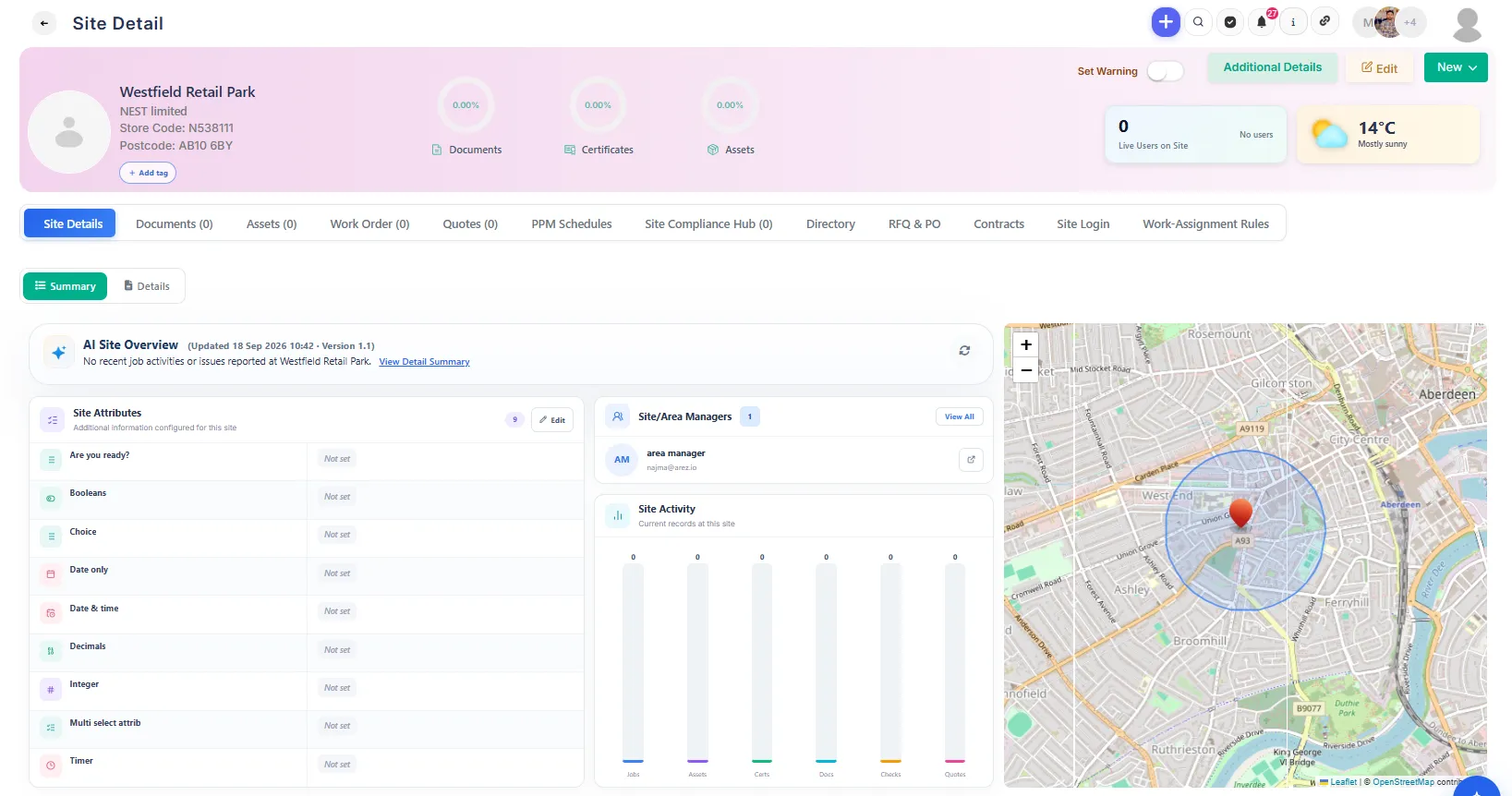
The six layers of a Site
Layer | What it answers | Examples | How Arez treats it |
|---|---|---|---|
Core Site fields | What site is this? | Name, client, site number, address, postcode, status | Stable fields Arez relies on for Jobs, permissions and reporting |
Site Structure | How is it classified? | Site Type, Region, Area, Level 3, Level 4 | Controlled lists set once per client, used everywhere |
Attributes | What facts describe it? | Security Level, Opening Hours, Access Type, Property Reference | Your own fields, available on every Site for that client |
Tags | Which groups is it in? | Flagship, Refurb 2027, London Portfolio | Light labels for grouping and filtering |
Ownership & contacts | Who owns it, who do I call? | Site Manager, Primary Site Contact, Directory | One accountable owner, as many contacts as you need |
Live operational data | Is it OK right now? | Open Jobs, overdue certificates, next PPM, compliance | Calculated by Arez from live records |
Where should new information go?
Ask these questions in order. Stop at the first yes.
Ask | If yes, use | Example |
|---|---|---|
Does Arez need it to run Jobs or workflows? | Core Site field | Site Manager, status, address |
Is it a classification shared across the whole portfolio? | Site Structure | Region, Area, Site Type |
Is it a fact with a clear type or value? | Attribute | Parking = Yes; Security Level = Restricted |
Is it a flexible or temporary grouping? | Tag | Refurb 2027 |
Is it a person? | Site Manager, Primary Contact or Directory | Sarah Collins |
Can Arez work it out from live records? | Nothing to add | Open Jobs, Compliance % |
WORKED EXAMPLE Your client asks you to record three things on their stores: whether there is parking, which stores are in next year's refurb, and the name of each store manager. Parking is a fact with a Yes or No answer, so create a Yes/No Attribute called Parking. Next year's refurb is a temporary group, so create a Tag called Refurb 2027 and add it to those stores. Store manager is a person, so add them to the Directory and set them as Primary Site Contact. And whether the store is compliant? Nothing to add. Arez already calculates it. |
If two places could hold the same information, pick one. Keeping a fact in two places is how records drift apart.
Core Site fields
Core fields are the small set Arez itself understands: Site Name, Client, Site Number or Store Code, address and postcode, status and Site Manager. They power Job creation, assignment, permissions, reporting and integrations, which is why we keep the list short.
Need something extra? An Attribute is almost always the right answer. Your existing Additional Information fields stay exactly as they are.
Site Structure
Site Structure classifies your whole portfolio using controlled lists. You set the values once for a client, then pick from them on each Site. Because everyone chooses from the same list, a filter for Region = North returns every northern Site, with no spelling variations slipping through.
Where: Management Console, in this order: Site Type, Region, Area, Level 3, Level 4.
Site Type describes what the site is, such as Delivery Office, Depot or Retail Store. Use status for Active or Inactive.
Tip: imported data can be messy. Tidy up duplicate or misspelt values in the list rather than working around them.
Attributes
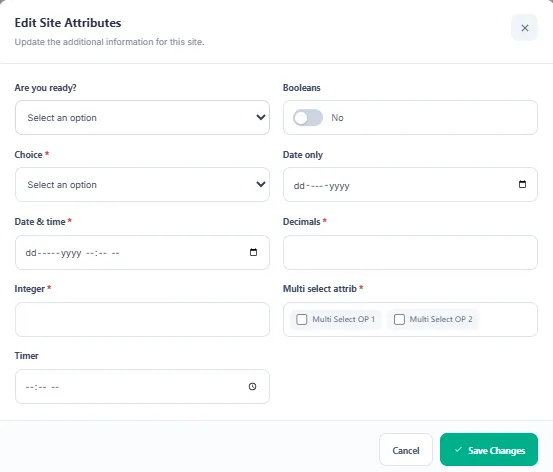
Attributes let you capture the facts that matter to each client without anyone needing to change the product. Arez includes ready made templates to get you started, and you can add your own.
Define once, use everywhere. You create the Attribute in the Management Console and it appears on every Site for that client.
Simple to set up. Give it a name and a field type. For lists, add the allowed options.
Front and centre. Attributes sit near the top of Site Detail because they describe what the site is.
Field types
Type | Good for | Example |
|---|---|---|
Text | Short free text | Property Reference |
Number | Counts and measures | Floor Area |
List | A fixed set of choices | Security Level = Restricted |
Date | Key dates | Lease Expiry |
Yes/No | Simple checks | Parking = Yes |
Memo | Longer notes | Access Instructions |
Use an Attribute when
You want to report or filter on the value consistently
The value has a clear type, such as a date, number or choice
Every Site should have the chance to capture it
There should be one clear answer per Site
Tags
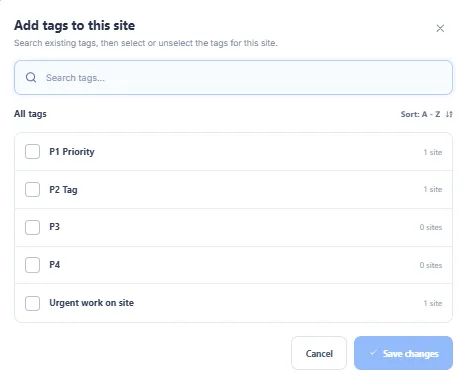
Tags are light labels for portfolios, programmes and anything that cuts across your normal structure: Flagship, Refurb 2027, London Portfolio, High Attention. They are for grouping, not for storing facts.
Create Tags in one place: Management Console, Site Settings, Tags. This keeps your Tag library clean.
Add as many as you like. Site Detail shows the first three, with the rest shown as +N.
Remove safely. Clicking × on a Tag removes it from that Site only. The Tag stays in your library.
Don't double up. If Parking is already an Attribute, filter by the Attribute rather than creating a Parking Tag.
Filtering by Tags: Match Any or Match All
When you pick more than one Tag, Arez always tells you how it is combining them. Open the Tags filter, search or tick your Tags, and choose Match Any or Match All. Any is the default.
Site | Tags on the Site | Match Any: Commercial, High Security | Match All: Commercial, High Security |
|---|---|---|---|
Store A | Commercial | Shown | Hidden |
Store B | High Security | Shown | Hidden |
Store C | Commercial, High Security | Shown | Shown |
Once the filter is closed, it reads as plain text such as Commercial, High Security. Your selected Tags also appear beside the result count, for example Tags (Any): Commercial × High Security ×, so you can remove one without reopening the filter.
Site Manager, Primary Site Contact and Directory
Arez separates who is accountable for a Site from who you talk to. A Site can have many contacts but only one owner, so nothing falls between two people.
Role | What it means | How it works |
|---|---|---|
Site Manager | Your internal owner for the Site | One per Site; can be added to new Jobs automatically |
Primary Site Contact | The main customer or on site contact | Optional; chosen from the Directory |
Directory | Everyone connected to the Site | As many as you need; does not imply ownership |
Reading Site Detail
Site Detail answers questions in the order an FM manager asks them, so the most urgent answer is always at the top.
Your question | Where to look | |
|---|---|---|
1 | Is this site OK? | Open Jobs, Overdue Certificates, Next PPM Due, Compliance |
2 | What is this site? | Core details, Attributes and Tags |
3 | Who owns it and who do I contact? | Site Manager and Primary Site Contact |
4 | Where is it? | Site Location |
5 | What is happening? | AI overview, certificates, Jobs and financial panels |
Honest numbers: zero is not the same as no data
WHAT MAKES AREZ DIFFERENT Many dashboards show 0% when there is simply nothing to measure. That puts a Site in the red for no reason and sends people chasing problems that don't exist. 0% compliance in Arez means compliance was measured and the result was zero. That needs action. — or No certificates yet means nothing has been measured. That needs setting up, not escalating. The same rule applies across Site metrics, KPIs and reports, so a red number in Arez is always a real one. |
How Site information helps your Jobs
Sensible defaults. The Site Manager can fill in the Job's Arez Manager automatically. You can still change it on the Job.
Always current. Site Attributes shown on a Job are read live from the Site, so engineers see today's access type or opening hours, not a copy from when the Job was raised.
Kept separate. Job specific Attributes stay on the Job and never overwrite Site information.
Ask FieldIQ about your Sites
Because every fact has one clear home, FieldIQ can answer questions about your portfolio in plain English, including from AI assistants such as Claude and ChatGPT. It is included with FieldIQ at no extra charge.
TRY ASKING Which London Portfolio sites have overdue certificates? Show me Restricted security sites with open Jobs this week. Which Refurb 2027 stores have no compliance data yet? |
Answers follow your normal Arez permissions, so people only see the Sites they already have access to.
Good habits
Do | Avoid |
|---|---|
Use an Attribute when you need a new field | Asking for a new core field when an Attribute will do |
Use Tags for groups and programmes | Using Tags to store facts like Parking or Security Level |
Keep each fact in one place | Recording the same fact as both an Attribute and a Tag |
Add only the Attributes you will actually use | Setting up fields just in case |
Let Arez calculate status from Jobs, PPM and certificates | Typing status or compliance in by hand |
Read — as "not measured yet" | Treating a missing value as a failure |
Quick reference
CORE System truth | STRUCTURE Classification | ATTRIBUTES Facts | TAGS Groups | LIVE DATA Operational truth |
Related articles
Configure Site Structure for a client
Create and manage Site Attributes
Enter Attribute values on a Site
Create and manage Site Tags
Add or remove Tags on a Site
Filter Sites using Tags
Set up the Site Manager, Primary Site Contact and Directory